The Hospitality Loyalty App user can insert items available in the menu into a basket.
If the Hospitality Loyalty App user is a registered member, the user can also select to use coupons into the basket.
The App does not finalize the order for the app user but creates a QR code based on basket’s items and the Hospitality POS can then scan the QR code and create and identical order.
The process:
- A Hospitality Loyalty app user creates a basket of item/items.
- The items the user selects can be regular items, recipe and/or a deal.
- When needed the user excludes ingredients from the recipe
- When needed the user adds modifiers for recipes and deals
- When everything has been selected into the app‘s basket the user finalizes the basket and a QR code is created.
- The user takes its mobile device to the restaurant and displays the QR Code.
- The Hospitality POS user starts a transaction.
- The Hospitality POS user uses a scanner to scan the QR Code into the transaction.
- The system scans in the items and deals, member info and coupons based on information from the QR Code.
- One line is created for each item in the QR Code
- All modifier lines are created, based on the QR Code information
- The Hospitality POS enters the price for the items as are valid for the sale in this restaurant, no prices are imported from the app.
- The Hospitality POS user can add to or modify the lines as in any other sale.
- The Hospitality POS user finalizes this sale as any other sale
|
|
|
|
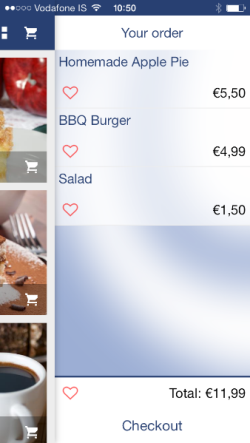
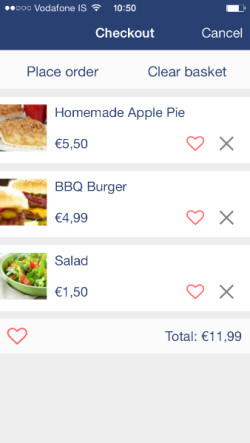
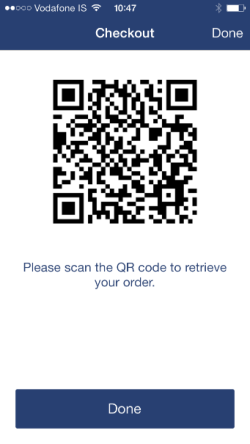
The Hospitality POS always imports the items from the QR code and enters them into the sale with prices as are correct in the current restaurant dependent on prices, deals and so on.
So it can happen that the app displays some prices that are general in the company but not the same as in the restaurant where the order is created and finalized. The resulting price can either be higher or lower than shown on the app; it all depends on the data and time of usage.
This can be due to many reasons as:
- Prices have changed since the app user created the order
- Prices are different between restaurants
- Offers have changed their price
- New offers are valid
- Some offers are out of date or not in correct time interval
- Member settings may have changed
- Ingredients are excluded, resulting in a lower price on the POS, not shown in the Apps.
- It is possible to add item modifiers for free (up to a certain number, specified for the item). This shows on the POS but not in the Apps.
Tip: If the Hospitality user is having trouble to scan in the QR code check that the scanner is connected and if the QR code is displayed bright enough in the smartphone.