The main functionality of the Safe Management is handled under Safe Management in LS Retail – BackOffice. However, some of the most important settings are to be found elsewhere. This topic provides a basic overview and guidelines to the functions available in Safe Management.
Before you begin:
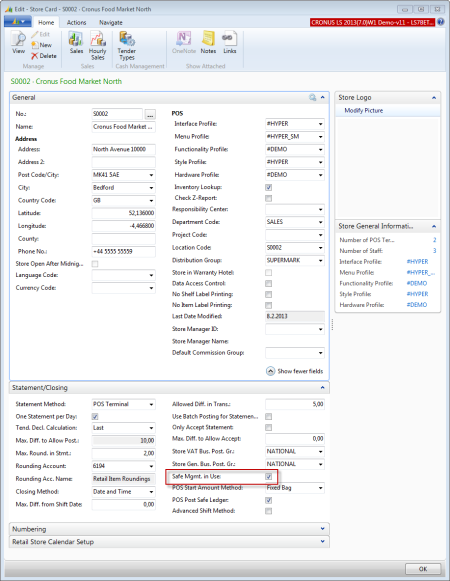
To use Safe Management, select the Safe Mgmt. in Use check box on the POS’s Store Card. To do this, navigate to LS Retail - BackOffice - Store Management - Lists - Stores, select a store, and then open the Statement/Closing FastTab.
A store for the safe has to be available.
To create a new store
-
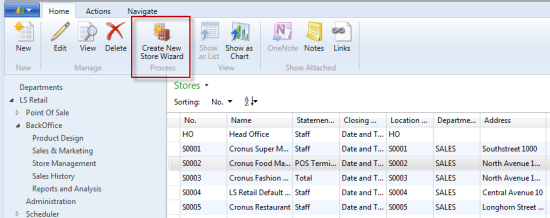
Navigate LS Retail - BackOffice - Store Management - Lists - Stores, and click the Create New Store Wizard action on the Home action menu:
- On the Stores page, click the store you want to open a Store Card for. Go to the Statement/Closing FastTab.
-
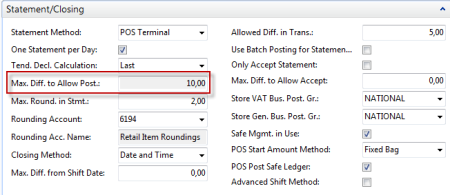
The field Max. Diff. To Allow Post becomes non-editable (grayed out) after you select the Safe Mgmt. in Use check box.
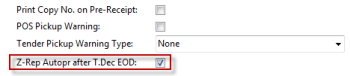
Note: We recommend that you select the Z-Rep Autopr after T. Dec EOD check box on the Functionality Profile Card for the store. The Z-report will be printed automatically after the Tender Declaration or End of Day Declaration (see Selling on the POS).
See Also
Using Safe Management – From Beginning Until End-of-Day